NotesBot
NotesBot

Never take meeting notes again

NotesBot joins your voice channel, captures every speaker in studio quality, and posts the notes when you type /leave.

  • One-time 30-minute free trial, no credit card
  • Pick a server where you have Manage Server, approve, then type /join in any text channel while you're in a voice call.
  • Save every call to your Google Drive as a formatted Google Doc
Animated example: someone types /join and NotesBot joins the voice call, records each speaker on their own track, then posts the audio, the transcript and the notes in a thread after /leave.
Hours transcribed
30,000+
Calls summarized
21,000+
Languages
80+
notesbot is much better than any other competitor I tried for automating AI based notes taking and transcripts
dj · Discord User

Up and running in seconds

Three steps, plus one command for admins

  1. Add NotesBot

    Invite the bot and approve the permissions it asks for.

  2. Type /join

    Hop into any voice channel. NotesBot records everyone.

  3. Type /leave

    Notes, transcript, and audio post in a thread.

One-time 30-minute free trial, no credit card

Pick a server where you have Manage Server, approve, then type /join in any text channel while you're in a voice call.

Read the full guide

Or /help in Discord, 13 short topics.

See what your server gets

What NotesBot posts after a call, in Meeting and D&D mode.

Studio-grade audio
Every speaker on a separate track, mixed to clean 48kHz audio.
Top-tier models
Best-in-class transcription reads that clean signal.

Sample calls, formatted the way real ones are.

product-sync42 min call
Call Meeting Aug 24 - product-sync3 messages

NotesBotAppToday

📂 Recording file ready:

call-audio.mp38.4 MB

NotesBotAppToday

📄 Transcript

transcript.txt38 KB

NotesBotAppToday

📋 Notes from the Call

👥 Speakers: Maya, Sam, Ravi, Elena

Meeting Notes: Weekly Product Sync

🚀 Release Planning

  • Maya confirmed the v2 dashboard ships Thursday, once the billing fix is merged and tagged.
  • Ravi flagged that the onboarding emails still link to the old help center and need updating first.

🐛 Open Bugs

  • CSV export times out on files over 200 MB. Sam is adding pagination and will post load-test numbers.
  • Two users reported a blank screen on Safari after login. Elena will reproduce it and file a ticket.

🧩 Next Steps & Responsibilities

  • Maya: merge the billing fix, then tag the v2 release.
  • Ravi: update the onboarding email links by Wednesday.
  • Sam: ship export pagination and share the load-test results.
  • Elena: reproduce the Safari login bug and open a ticket.

⏱️ Remaining recording time: 6h 18m

📊 View full call details

📝 Notes by NotesBot · Add to your server

/setup

Set it up once

One panel, six pages.

  • OverviewSee how the server is set up
  • Where notes goPick the channel each call posts in
  • Auto-recordHave NotesBot join by itself
  • Team & billingShare one person's plan with the server
  • How I recordWho I skip, and who can stop me
  • What I sendSummary, transcript, audio, timezone

Any voice channel or category can get a place of its own, up to 25 rules. Preview shows the real answer.

/setup and the dashboard write the same settings. Last save wins.

See how /setup works

Built for servers

  • Share your plan

    No server plan to buy: Team & billing picks whose plan pays and which role may record. They approve by DM once, or start instantly setting it up themselves.

  • Hands-free recording

    NotesBot can start when an authorized member joins and stop when the channel empties, once a plan is shared.

  • Every server, one page

    The dashboard lists every server you admin, with its own settings and history.

See plan sharing
Hands-free recording

Record every room at once

Each assistant you invite adds one more simultaneous recording, up to seven. All calls draw on the same balance.

  1. 1

    Type /join in a second voice channel

  2. 2

    Invite the assistant bot when prompted

  3. 3

    Stop the right call with the /leave picker

Invite the assistants

They join, record and leave. Notes come back from NotesBot.

See the full guide

Every meeting, instantly searchable

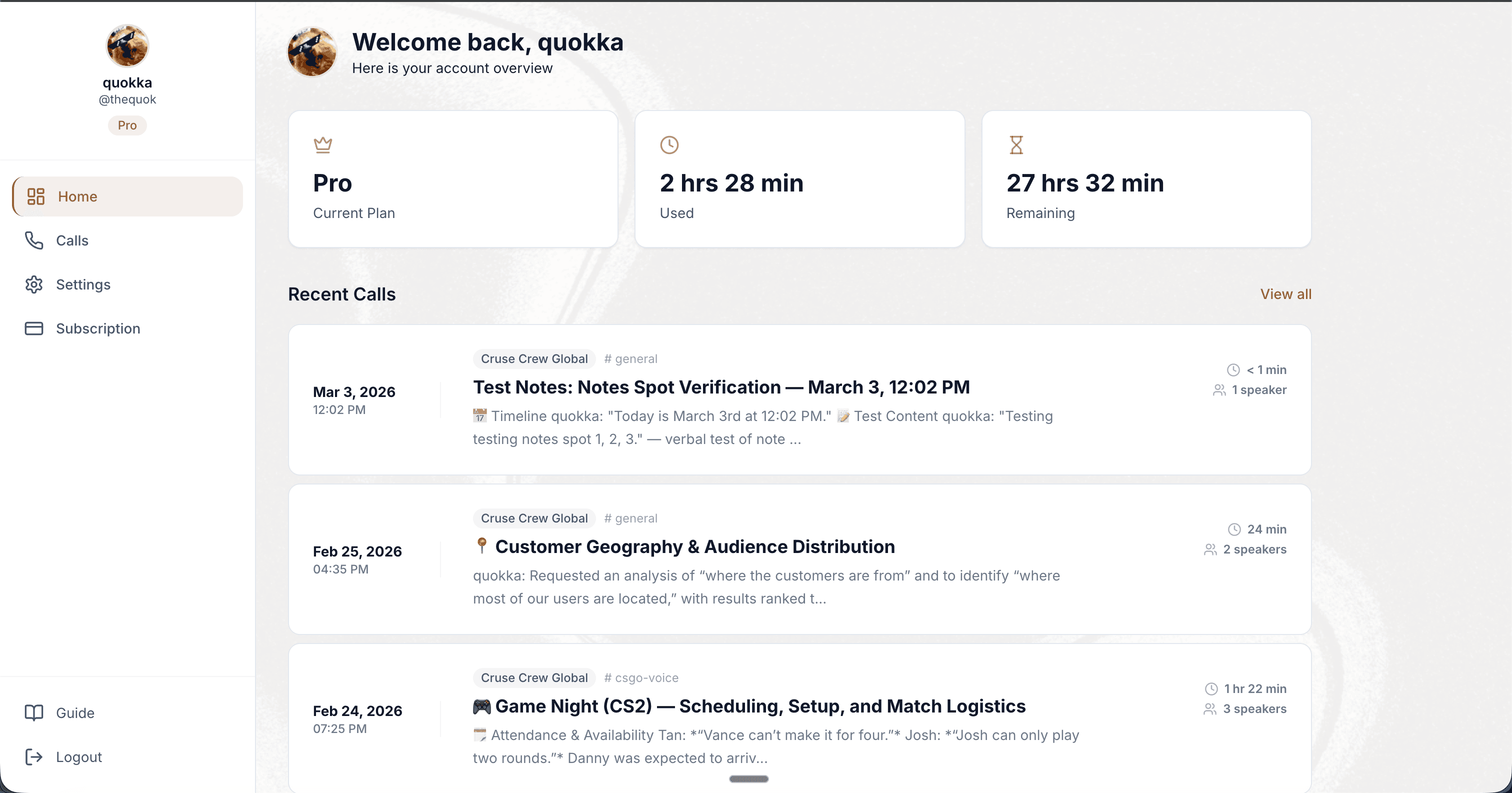
History, transcripts, audio and settings.

Manage servers

No new account needed

  • Call History
  • Audio Playback
  • Full Transcripts
  • Google Docs
  • Full-Text Search
  • Also the only editor for most server settings.
NotesBot dashboard showing call history, transcripts, and audio playback

Your audio, your rules

Read the privacy policy

Audio
Deleted from the bot after processing. The stored recording is kept two weeks, and whoever's plan paid can delete it.
Secure
Everything moves over HTTPS.
In the open
NotesBot joins as a visible member and says when recording starts. Whoever's plan pays for the recording can exclude anyone with /ignore, and admins exclude roles from the dashboard.

Simple, honest pricing

Start with a one-time 30-minute trial.

Basic

$3/mo

5 hrs recording / month

For the occasional call you want written up.

  • AI notes and action items in your channel
  • Full transcript with speaker names
  • MP3 recording you can download
See everything included

Standard

$5/mo

10 hrs recording / month

For a small group that meets every week.

  • AI notes and action items in your channel
  • Full transcript with speaker names
  • MP3 recording you can download
See everything included
Best for most servers

Plus

$10/mo

20 hrs recording / month

For an active server with several calls a week.

  • AI notes and action items in your channel
  • Full transcript with speaker names
  • MP3 recording you can download
See everything included

Pro

$15/mo

30 hrs recording / month

For a busy community recording most days.

  • AI notes and action items in your channel
  • Full transcript with speaker names
  • MP3 recording you can download
See everything included

Need more hours?

  • Premium40 hrs, $20/mo
  • Ultimate100 hrs, $40/mo
  • CustomContact us
  • The trial needs no card
  • Cancel anytime
  • Secure checkout by Stripe
  • All prices in USD

Every plan has everything: summaries, transcripts, MP3s, Google Docs, custom prompts. Hours reset each billing cycle.

Each call records up to 10 hours, in either mode.

See all plans

Questions, answered

Yes. One 30-minute trial per new user, all features, no credit card, no renewal. A server can host three trials or 90 minutes of trial time in total, and a shared plan switches them off.

Ready to stop taking notes?

Trusted with 30,000+ hours of conversations.

One-time 30-minute free trial, no credit card

Pick a server where you have Manage Server, approve, then type /join in any text channel while you're in a voice call.

Developer API

Pull calls, transcripts and summaries over REST.

Explore the API